All Download: Video Downloader
- 4.3
- Rating
- 1.00M
- Installs
- Free
- Price

 Analysis by App-foxy
Downloading a clip from a social platform sounds simple until the saved file is missing, the wrong video appears, or the result does not play properly in the gallery. All Download: Video Downloader is built for that everyday task. It sits in the video players and editors category and focuses on saving videos from Instagram, Facebook, and TikTok, including clips without a watermark. I tested it with the mindset of someone who wants a quick, usable copy rather than a complicated editing suite, and my overall impression is that it can be convenient when the source behaves as expected, but it is not a universal fix for every download problem.
The app is free to install, with optional in-app purchases ranging from $1.99 to $19.99 per item. It is published by Video downloader for all and is suitable for Everyone. Its current version is 1.6.8, and it works on Android 8.0 or later. Those details matter because an older phone, an outdated installation, or expectations about completely free use can affect the experience before the first download even begins.
Getting past the points where downloads usually fail
The first thing I would tell a friend is not to assume that a failed download means the app is broken. Social platforms change their page layouts, restrict certain posts, and sometimes require a login before a video can be viewed. A downloader can only work with what the source makes available. If a public clip loads normally in the original platform but the downloader receives an incomplete page, the problem may be the platform’s current delivery method rather than the phone or the app.
You May Also Like

 Blood Strike: 2.5 Anniversary
Blood Strike’s Loadouts Turn Every Drop Into a Tactical Gamble
A close look at Blood Strike’s custom loadouts: how fast access to signature weapons reshapes its battle royale rhythm, rewards preparation, and narrows the gap between fights.

 Pandora - Music & Podcasts
Pandora’s Music Is Easy to Start, but Harder to Recover
Pandora’s strength is its low-effort path from a seed to a station. Its weak spot is how much confidence it asks you to place in connection, setup, and quiet recovery.

 8 Ball Pool
 Is Built on Rivalries, Rematches, and Routine
A close look at the rivalries, rematches, shared routines, and unanswered safety questions that turn a quick pool match into a persistent mobile community.

 Samsung Music
’s Quiet Strength Is Playing What You Already Own
Its reach comes less from spectacle than from dependable access to a personal library. That simplicity is both the app’s strongest retention engine and its ceiling.

 AccuWeather: Weather Radar
AccuWeather Review: A Quick, Clear Forecast for Everyday Decisions
For everyday plans, the best forecast is the one you can understand quickly. AccuWeather makes rain timing, radar, and local conditions easy to act on, with a few trade-offs.

 Hill Climb Racing
Why Hill Climb Racing Still Turns Crashes Into One More Run
A tiny car, a bumpy hill and one more upgrade: Hill Climb Racing keeps resurfacing because its simple chaos makes every near-miss feel personal.
More From Our News Desk



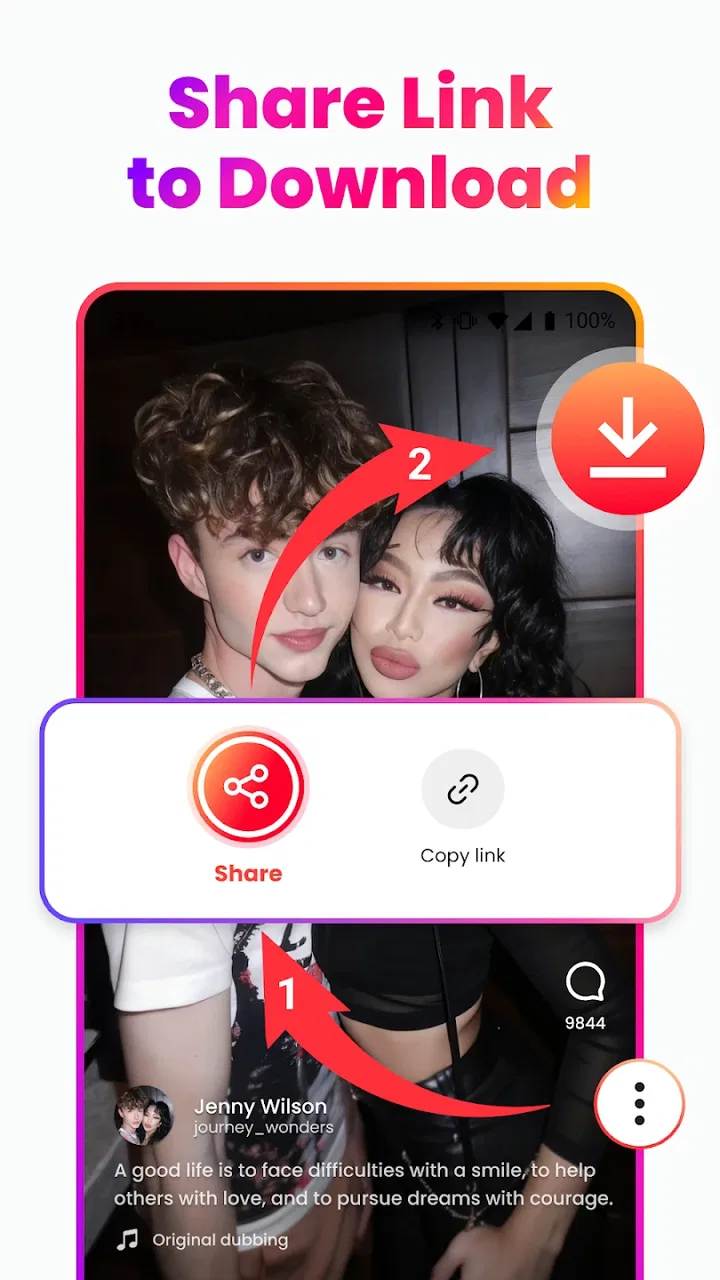
The most common point of friction is choosing the correct sharing action. When I want to save a video, I first open the original post, use the platform’s own share control, and look for the option that copies or shares the post address. I avoid copying text from the caption or a profile page because that can send the downloader to the wrong destination. A link to a user profile is not the same as a link to a particular video, and that small difference can explain why the result is empty or unrelated.
It is also worth checking whether the item is genuinely a video. A carousel, a story that has expired, a live broadcast, and a post containing several media items may not behave like a standard public clip. The app’s purpose is clearest with an individual video post. If the source is private, age-restricted, region-limited, or visible only to selected followers, I would not expect a straightforward save. Trying several times will not make unavailable content become available.
Another practical issue is destination confusion. A successful download may not appear in the same place as a camera recording. I recommend opening the phone’s file manager and checking the recent files area, the video folder, and any folder associated with downloaded media. Gallery apps can also take a moment to index a new file. If the file exists in storage but is not visible in the gallery, restarting the gallery app or the phone can be more useful than repeating the download.
The best first troubleshooting step is to separate a link problem from a storage problem. If the app shows progress but no video appears, inspect available storage and the file manager. If it rejects the link immediately, return to the source platform and copy the address again. These two symptoms look similar but need different responses.
A careful setup saves time later
Before using All Download regularly, I would install it on a supported Android device and make sure the operating system is at least Android 8.0. I would also update the app when an update is available, especially if a platform has recently changed how its videos are displayed. A downloader that worked last week can need maintenance after a social network redesign, so keeping the installation current is a sensible part of the setup rather than an optional extra.
Next, I would open the app and familiarize myself with its main input method before attempting a large batch. The useful habit is to work with one test video first. Choose a short, public clip that you are allowed to save, copy its direct post address, and check that the resulting file opens in the phone’s normal video player. This test confirms several things at once: the link was copied correctly, storage is available, the file can be written, and the phone can play the format.
I would not begin by downloading many clips from different services. Testing one Instagram video, one Facebook video, and one TikTok video separately makes it easier to identify where a problem begins. If Instagram works but Facebook does not, that points toward the source or its access requirements. If none of them work, I would look at the link, the network connection, the app version, and storage before blaming a particular platform.
Network quality matters more than people expect. A page may load on a weak connection while the actual video stream fails halfway through. When a download stalls, I try a stable Wi-Fi connection, keep the app in the foreground, and avoid switching repeatedly between applications. I also check whether the phone has entered a restrictive battery-saving mode. General battery controls can pause background activity, so a download that seems frozen may simply have lost permission to continue while another app is open.
Storage checks deserve more attention than a quick glance at the free-space indicator. Large videos need room for the completed file, and the phone may also need temporary working space during the process. If storage is nearly full, I remove old downloads or move personal recordings before trying again. The safer approach is to create space first rather than repeatedly tapping download and ending up with several partial files.
Because the app is free but offers optional purchases, I would also pay attention to any purchase screen before confirming anything. A user who only wants occasional downloads should decide whether the free experience is enough for their needs. Someone who dislikes optional upgrades or expects every function to be unlimited without payment may prefer a simpler tool or the platform’s own offline options where available.
Recovering a failed or incomplete workflow
When a download fails, I use a short recovery sequence instead of changing several things at once. First I cancel the stalled attempt if the interface allows it. Then I copy the direct video address again from the original post, return to the downloader, and retry on a stable connection. If that does not work, I test a different public clip from the same service. This comparison tells me whether the issue is tied to one post or affects the whole service.
If the second clip works, the original post is probably the difficult part. It may contain restricted access, an unusual format, multiple media items, or a link that does not point directly to the video. In that case, I stop wasting time on repeated attempts and look for a standard public post instead. A downloader is most dependable when the source is clearly accessible and the shared address leads directly to one video.
If every test fails, I move to the phone rather than the source. I check free storage, confirm that the device meets the Android requirement, close and reopen the app, and restart the phone if necessary. I then try a fresh link copied from the platform’s share menu. This is basic troubleshooting, but it is effective because it removes stale link data and temporary system glitches without introducing risky changes.
A partially saved file should be treated cautiously. If it appears in the gallery but refuses to play, I delete that incomplete copy and start again with the original post. Keeping several broken copies only makes it harder to identify the valid file. I also avoid renaming or moving a file while a download is still active, since that can make the app lose track of its destination.
One useful workflow is to save important clips in small groups and check them before continuing. I would download a few items, open each one, and then organize them into a folder or album. This catches failures early and prevents a long queue from producing a collection of files that all need inspection. It is especially helpful when saving reference material for a trip, a class, a personal project, or a private collection of recipes and demonstrations.
For people who intend to edit the saved videos, I recommend checking the result before importing it into an editor. Confirm that the picture is complete, the sound is present, and the orientation is correct. A file that plays in one gallery app may still expose compatibility issues in a separate editor. If the clip is going into a larger project, keep the original download untouched and work from a copy. That simple habit protects the source if an editing app changes the file or creates a new export.
When the downloader is not the real cause
There are situations where no downloader can provide a clean result. If a platform requires authentication, the post is private, or the creator has limited visibility, the correct answer is not to keep searching for a workaround. The app is intended for accessible content, and respecting the creator’s settings is part of using it responsibly. I would use it for videos I have permission to save, my own posts, or material clearly offered for reuse.
Watermark expectations also need a realistic explanation. The app is presented as a way to save videos without a watermark, which can be useful when the source and download path support that result. However, removing a visible mark does not remove ownership or usage restrictions. A clean-looking file may still belong to its creator, and I would not repost or edit someone else’s work simply because the saved copy looks ready for publication.
Playback failures can come from the phone’s media support rather than the download itself. If the file opens in another video player but not the default gallery, the gallery is the weak link. If it fails everywhere, I repeat the test with a different public clip. One bad source file should not be used to judge the entire app. Conversely, if every saved file fails, I would investigate the phone, storage, or current platform compatibility before assuming the problem is isolated to one video.
Network filters can also interfere. School, workplace, hotel, or public Wi-Fi may restrict social platforms or large media transfers. A source page that works on mobile data but not on a particular Wi-Fi network points toward that connection. I would not change advanced phone settings blindly; testing a normal, trusted connection is safer and provides a clearer answer.
Finally, the social platform itself may alter its behavior without warning. A downloader can remain installed and appear normal while a specific service changes its link structure. This is where the app’s version becomes relevant: using version 1.6.8 gives the best chance of benefiting from current maintenance, but it cannot guarantee compatibility with every future platform change. If one service temporarily stops working while another continues normally, patience and an app update may be more sensible than repeated reinstallations.
Who will get the most from it?
I see the strongest use case in someone who wants a quick personal archive of public clips from several major social platforms. For example, imagine saving a set of short cooking demonstrations before a weekend away. I would copy each direct post address, download a few at a time, verify that they play, and place the successful files in one album. That workflow is faster than recording the screen, avoids the extra visual clutter of a screen capture, and leaves a file that is easier to review later.
It can also suit a small-business owner collecting their own promotional clips for offline reference, a student saving permitted educational demonstrations, or a traveler keeping public instructions available when connectivity may be unreliable. In each case, the benefit comes from convenience and organization, not from bypassing access controls. The app makes most sense when the user already has a legitimate reason to keep the video.
The app is less suitable for someone who needs advanced editing, automatic cataloging, cloud synchronization, or professional media conversion. Its focus is downloading, not replacing a full editor or a file-management system. If your main goal is trimming, adding captions, balancing audio, and publishing a finished production, a dedicated editor will be a better center of your workflow. You can still use this app as the first step, but it should not be mistaken for the complete production tool.
I would also hesitate to recommend it to anyone who expects every private, restricted, or disappearing post to download. That expectation will lead to frustration. The same applies to users who want a completely hands-off process that never requires checking links, storage, or the saved file. The app reduces effort, but it does not remove the practical responsibilities of handling online media.
How it compares with familiar alternatives
The most obvious alternative is screen recording. Screen recording works with almost anything visible on the display, but it captures notifications, controls, pauses, and sometimes uneven audio. It also requires the video to play in real time. All Download: Video Downloader is preferable when a direct public link is available and the goal is a cleaner saved file without the distractions of recording the screen.
Using the social platform’s own save or offline feature is often better when you only need to watch a clip inside that service. Those tools can be more respectful of creator controls and may require less file management. The trade-off is that the result may not be available as a normal video file in the phone’s gallery. This downloader is more useful when you specifically need a local copy for personal organization or later editing.
Browser-based download pages can seem convenient because they avoid installing an app, but they introduce extra steps, confusing buttons, and a greater risk of selecting the wrong file. They can also be awkward on a small screen. A dedicated Android app keeps the process closer to the phone’s normal workflow. On the other hand, a browser may be preferable for someone who downloads only once and does not want another app on the device.
Specialized tools for one platform may offer deeper compatibility with that service, while All Download covers Instagram, Facebook, and TikTok in one place. That breadth is useful, but it also means the experience can vary from one platform to another. I would choose it for convenience across those services, not because I expect identical results from every source.
My practical verdict after using it
All Download: Video Downloader earns its place as a straightforward utility for saving accessible social videos, especially when I need a local file rather than a bookmark or an in-app save. Its appeal is clear: it is free to start, supports the three platforms most people will ask about, and aims to produce clean copies without a watermark. The average rating is 4.3 from around eighteen thousand ratings, and the app has passed one million installs, which suggests that its basic purpose is useful to a substantial audience.
My recommendation comes with conditions. Start with one public video, copy the direct post address, check storage, and confirm the saved file before beginning a larger batch. Keep the app updated, do not treat a private or restricted post as a downloader failure, and remember that a watermark-free file is not automatically free of copyright obligations. Those habits make the experience much less frustrating.
For occasional personal downloads, the convenience is worth trying; for advanced editing or guaranteed access to every social post, choose a more specialized solution. I would recommend it to a friend who wants a practical Android downloader and is comfortable with a little link and file management. I would not recommend relying on it as a professional archive system or as a way around platform restrictions. Used within its natural limits, it is a useful, focused app rather than a magic answer to every video-saving problem.
In short, All Download: Video Downloader works best when the user’s expectations match its role. It can make a clean local copy of suitable public content with less hassle than screen recording, but successful results still depend on the source link, the network, the phone, and the platform. That balance is why I see it as a handy everyday tool for the right situation, not an essential replacement for every other video option.
FAQs for All Download: Video Downloader
01What is All Download: Video Downloader and how does it work?
All Download: Video Downloader is an app designed to help users download videos from various platforms directly to their devices. It supports multiple file formats and allows users to save videos for offline viewing. The app offers a simple interface, making it easy to paste URLs and initiate downloads with just a few taps.
02Is All Download: Video Downloader free to use, or are there any premium features?
The app is free to download and use, but it includes optional in-app purchases for premium features. These may include an ad-free experience, faster download speeds, and access to additional video conversion tools. Users can opt to enhance their experience by subscribing to these premium features.
03Which platforms and video formats are supported by All Download: Video Downloader?
All Download: Video Downloader supports a wide range of platforms, including popular sites like YouTube, Facebook, and Instagram. It allows users to download videos in various formats such as MP4, AVI, and MOV, ensuring compatibility with most devices. This flexibility makes it a versatile tool for video enthusiasts.
04Is All Download: Video Downloader safe and legal to use?
The app is safe to use, as it is regularly updated to protect against security vulnerabilities. However, users should be aware of the legal implications of downloading copyrighted content. It is important to ensure that downloaded videos are for personal use only and comply with the terms and conditions of the source platform.
05Can I download videos in high resolution with All Download: Video Downloader?
Yes, All Download: Video Downloader allows users to download videos in various resolutions, including HD and 4K, depending on the original video's availability. This feature ensures that users can enjoy high-quality content offline, but it's important to note that higher resolution files may require more storage space on your device.
Pros
- Supports multiple video formats and resolutions.
- Easy-to-use interface for quick downloads.
- Includes built-in video player for previews.
- Allows batch downloading for convenience.
- Fast download speeds enhance user experience.
Cons
- Contains ads that may interrupt usage.
- No option for automatic downloads.
- Limited support for streaming platforms.
- Requires manual URL entry for some videos.
- In-app purchases needed to unlock features.

All Download: Video Downloader
Gallery